

Known Issues and Technical Limitations
Why does the application show different values when using third-party aircraft?
All flight simulators use a standard data system to store variables (speed, altitude, engine data), which are then displayed on the instrument panel.
In a standard scenario, if the simulator records a fuel flow of 10 GPH, that data is directly linked to the panel’s fuel flow indicator. FSUIPC reads this internal value and exports it, while PeixConn forwards it to your Android device.
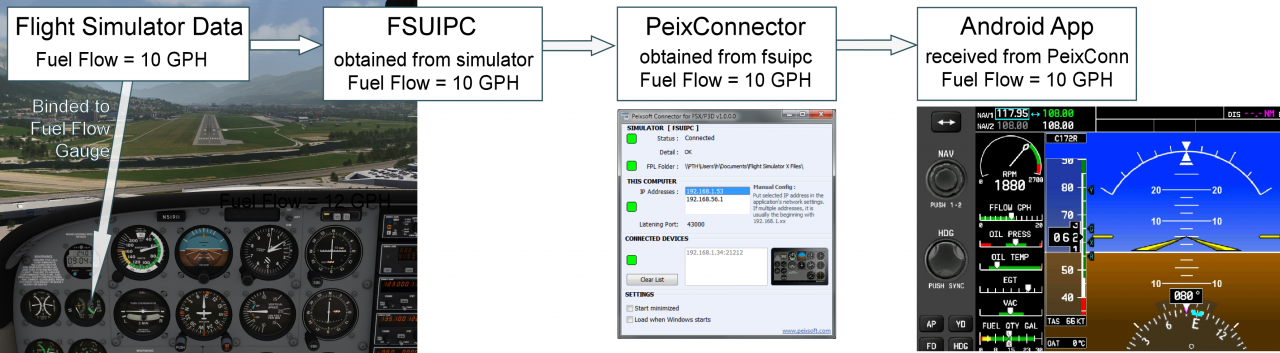
The “Custom Variable” Problem
However, many advanced developers (such as A2A, Carenado, PMDG, or Aerosoft) use their own proprietary data systems to achieve higher simulation accuracy. They often bypass the simulator’s standard variables in favor of custom L-Vars or local variables.
This creates a technical hurdle: this custom data is frequently not exported outside the simulator’s standard environment.
A third-party aircraft might be using its own complex fuel model, showing 12 GPH on its cockpit instrument. However, it has “decoupled” from the simulator’s internal variable, which might still be reporting the default 10 GPH.
Since FSUIPC can only access the simulator’s standard values—and not the proprietary data of third-party developers—it continues to export 10 GPH. As a result, the Android app displays the “official” simulator data instead of the “custom” value shown in the cockpit.
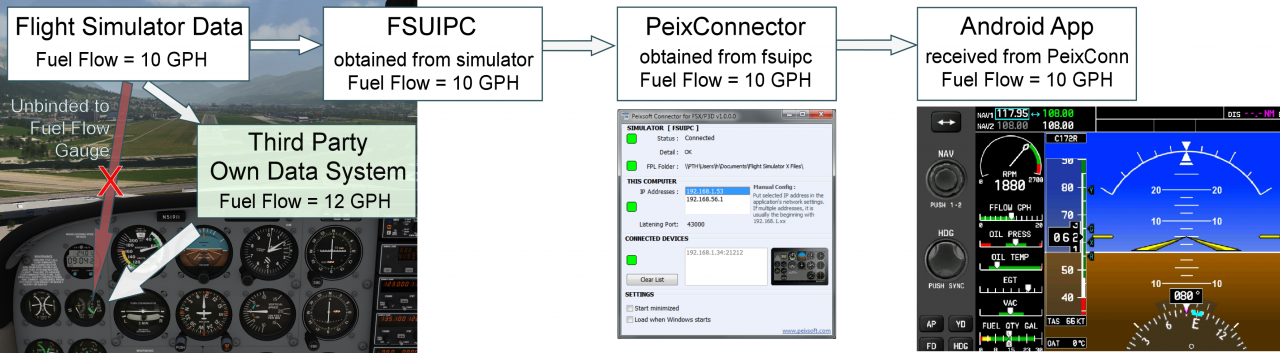
These differences are most frequent in:
- RPM
- Fuel Flow
- Oil temperature and pressure
- Specialized avionics states
- Auxiliary fuel pump switches specific to some aircraft
Because of this, external applications like mine may exhibit unexpected behavior with complex third-party aircraft. The app accurately reports the data it receives from the simulator, but that data no longer matches the aircraft’s custom gauges.